RAT execution for Multiple Basins
RAT 3.0 offers user the flexibility to run RAT for multiple basins using a single configuration file. Please note that this feature will not save time in execution of RAT for multiple basins or run it in parallel mode. It will simply execute RAT for each basin in a sequential mode. The only advantage of using this feature is that the user will not have to prepare and work with multiple configuration files which can be difficult to handle.
To implement this feature RAT uses basins_metadata which is a csv file that is multi-indexed and have same indexing as 'rat_config.yml'. Below is a snapshot of how basins_metadata should look like.
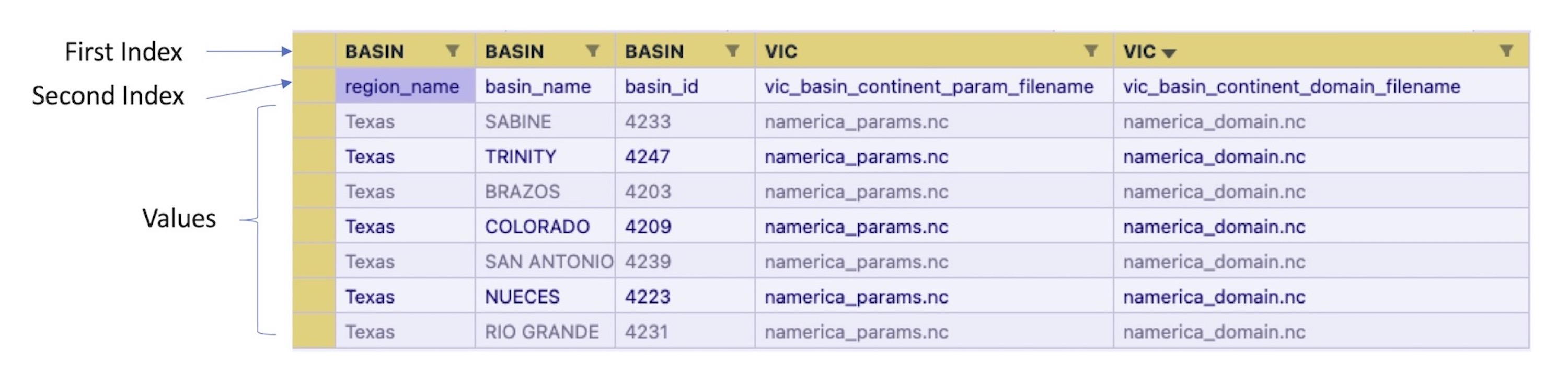
It should definitely have the index basin_name for section BASIN as it needs to be different for all basins and same is true for basin_id. Rest all those parameters which do not vary between basins can be provided in the configuration file and those which will vary must be provided in the basins_metadata csv file. A special index runfor section BASIN must be used in basins_metadata and it's value should be set to 1 to indicate which river basins should RAT run, otherwise 0.
Tip
- To make use of
basins_metadata,multiple_basin_runinGLOBALsection should betrue. - The values of
runinBASINmust be provided as either 1 or 0 for each basin in thebasins_metadatawhere 1 is for all the river basins for which you want to run RAT for. - A sample copy of
basins_metadatais provided in 'params' folder insideproject_dirwith the name of 'basins_metadata_sample.csv'.